
Shows an overview of the daemon lifecycles.
The "Back to previous page" and "Refresh overview" icons are at the top of the screen.
The columns are divided into
-
Type: e.g. MAIL, RE, RPE, SIS, VAULT
-
Name: Name of the daemons
-
Cluster (optional): Name of the associated cluster
-
Status: ALIVE, CLOSING, ERROR
-
Update: Daemon lifecycle update date
-
Message: Feedback from the daemon
-
Runtime: Lifetime of the daemon
-
"Clock backward" icon: Show daemon lifecycle history
-
Restart icon: Restart the daemon
-
Stop icon: Stop work and stop daemon
-
Plug icon: Stop daemon immediately
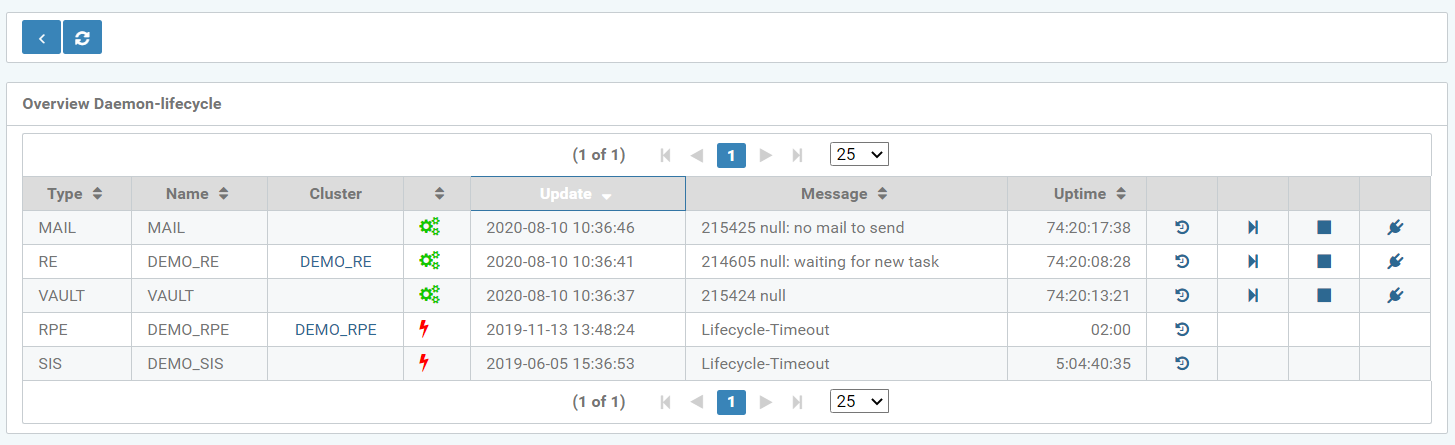
Figure: Overview of the daemon lifecycles
Clicking on a cluster name takes you to the corresponding cluster configuration.
When clicking on the History icon, a new table appears, containing the following history information:
-
Status: ALIVE, CLOSING, ERROR
-
Appendix: Creation date and time of the daemon lifecycle
-
Update: Update date and time of the daemon lifecycle
-
Runtime: Of each daemon lifecycle section
-
Show history of daemon lifecycle ("Clock backwards" icon)
-
Restart daemon icon (Play icon)
-
Stop the work and stop daemon (Stop icon)
-
Stop daemon immediately (Plug icon)